Application Scenarios
- Distribute resources to different workgroups to manage resources by group. As shown in Figure 4-3, the media belongs to the Shanxi workgroup and is shared with the Henan workgroup.
Figure 4-3 Media workgroups

- Specifying a workgroup for a user allows the user to modify and delete the data in the workgroup and its sub-workgroups only, and only to view and use the data shared from other workgroups.
As shown in Figure 4-4, the "zsn666" user can edit and delete the resources in the Shanxi workgroup and its sub-workgroups, and can only view and use the resources in the public workgroup and the resources shared with the Shanxi workgroup.
Figure 4-4 User workgroups

Related Information
- After successful registration, the system administrator (registered user) belongs to the System Workgroup by default in VNNOX AD and belongs to the All workgroup by default in iCare.
Figure 4-5


- Below are the permissions to access the data in different workgroups, as shown in Figure 4-6 and Figure 4-7.
- The system administrator can transfer the data of any workgroup to the public workgroup.
- Only the system administrator can modify and delete the data in the public workgroup and sub-users can only view and use the data.
- A user can modify and delete the data in the workgroup the user belongs to and its sub-workgroups, as well as can share the data with other sub-workgroups.
- The data shared from other workgroups can only be viewed and used.
Figure 4-6 Data operation permission–system administrator
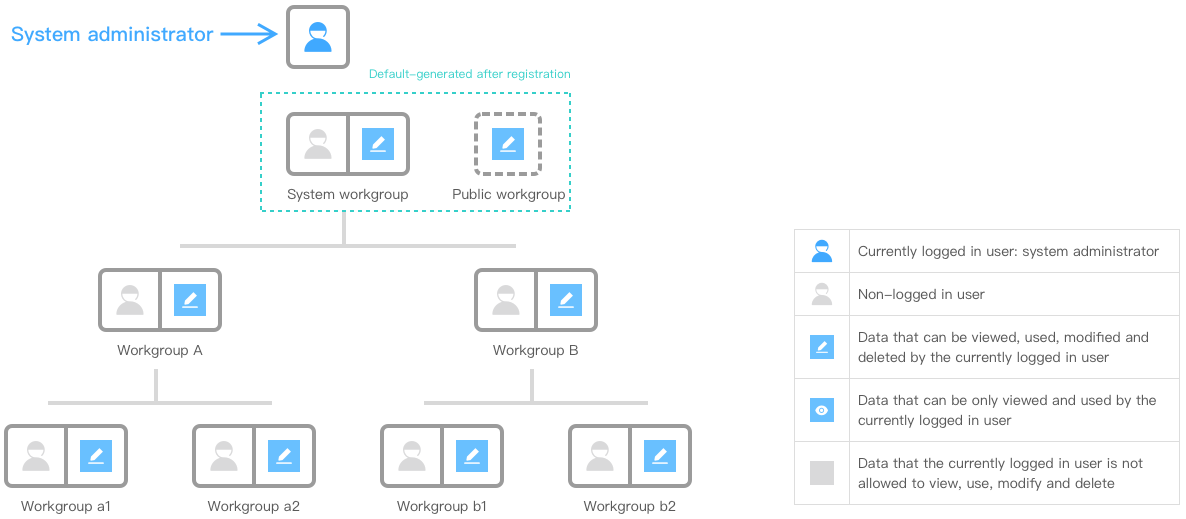
Figure 4-7 Data operation permission–sub-workgroup user

Step 1 Choose  > Workgroups.
View workgroup tree, or search for a workgroup by name.
Step 2 Click a workgroup name and click New.
Figure 4-8 Creating workgroups

Step 3 Enter a name for the sub-workgroup and click OK.
Up to 5 levels of sub-workgroups can be created in VNNOX.